New Quizzes, New Accessibility Coverage
Historically, the architecture behind Canvas New Quizzes limited the ability of third-party tools like UDOIT to interact with and evaluate quiz content.
That changed recently when Instructure introduced its New Quizzes Native Integration, moving New Quizzes out of its legacy iFrame architecture and directly into the Canvas experience.
The change was designed in part to allow accessibility tools and other third-party solutions to work more reliably with New Quizzes. Once access became available, our team immediately got to work.
As a result, UDOIT now scans New Quiz instructions for accessibility issues, helping institutions extend their accessibility reviews to another important area of Canvas course content.
We’re grateful to Instructure for granting us this access and for our continued partnership as our companies work together to improve the Canvas experience for all learners.
What UDOIT Users Will See
Along with the expanded scanning capabilities, users will notice a few other changes within UDOIT:
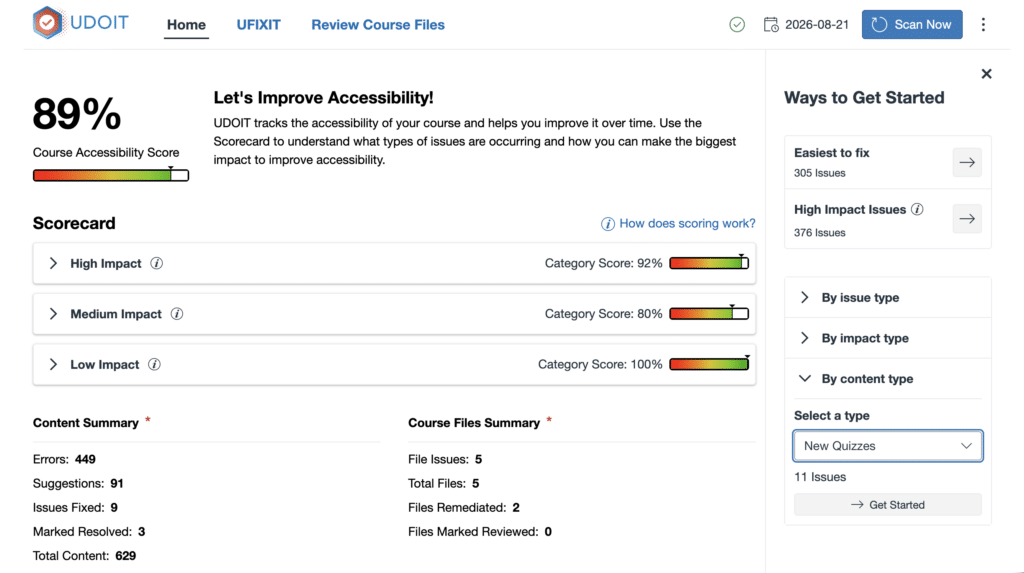
- New Quizzes are now available as a content Type in the UFIXIT table and filters.
- References that previously appeared simply as “Quizzes” are now labeled “Classic Quizzes” to distinguish between the two quiz types.
- Accessibility issues detected in New Quiz instructions will now be included in UDOIT results.
Because UDOIT now scans content that was not previously included, it’s possible that institutions may also see changes to their course accessibility scores. A change in score doesn’t necessarily mean the accessibility of a course has gotten worse. It may indicate that UDOIT can now see issues in content it previously could not evaluate.
To help institutions understand this change in their reporting, we’ve also added a Product Update Marker to UDOIT reports. This identifies when the expanded New Quizzes scanning was introduced and provides context for any resulting changes in accessibility scores.
Broader Coverage for a More Accessible Canvas Experience
As institutions prepare for evolving digital accessibility requirements, including Title II requirements, being able to identify accessibility barriers across as much course content as possible is increasingly important.
Expanding UDOIT’s coverage to New Quiz instructions is another step toward giving your accessibility teams, instructional designers, and educators a more complete picture of accessibility within your Canvas courses.
“Ultimately, accessibility isn’t about finding more issues, it’s about removing more barriers for students,” said Jennifer Malkovich, Vice President of Product Management at Cidi Labs. “Expanding what UDOIT can evaluate helps institutions identify accessibility concerns in more of the places where students actually learn and engage in Canvas.”
And as Canvas continues to evolve, we’ll keep looking for more ways to expand UDOIT’s coverage and help your institution find and resolve more accessibility barriers.
Interested in Learning More?
Explore more ideas, research, and strategies for improving accessibility in Canvas in the Accessibility Matters Digest, our collection of resources focused on digital accessibility, inclusive course content, accessibility best practices, and creating better learning experiences for all students.
 Imagine an instructor creates a New Quiz in Canvas and includes detailed instructions for students. But those instructions contain an accessibility issue, such as unclear link text or an image without alternative text.