Academic advisors, athletic directors and coaches, and student support staff often need to track student performance across many courses.
A coach may need to monitor the academic eligibility of student-athletes. A disability services team may be watching for students who need extra assistance. Or a dual enrollment coordinator might be responsible for tracking a cohort of students taking college courses.
In each case, having timely information about grades, missing assignments, and course activity is important. But gathering that information isn’t always straightforward. For example, with Canvas’s built-in Observer role, monitoring 10 students each enrolled in five courses, could mean individually navigating 50 course enrollments to gather key information.
ObservEd from Cidi Labs addresses this challenge by bringing student academic information together in focused dashboards within the Canvas LMS. And now, ObservEd’s new configurable risk assessment feature helps support teams proactively identify students who need additional support.
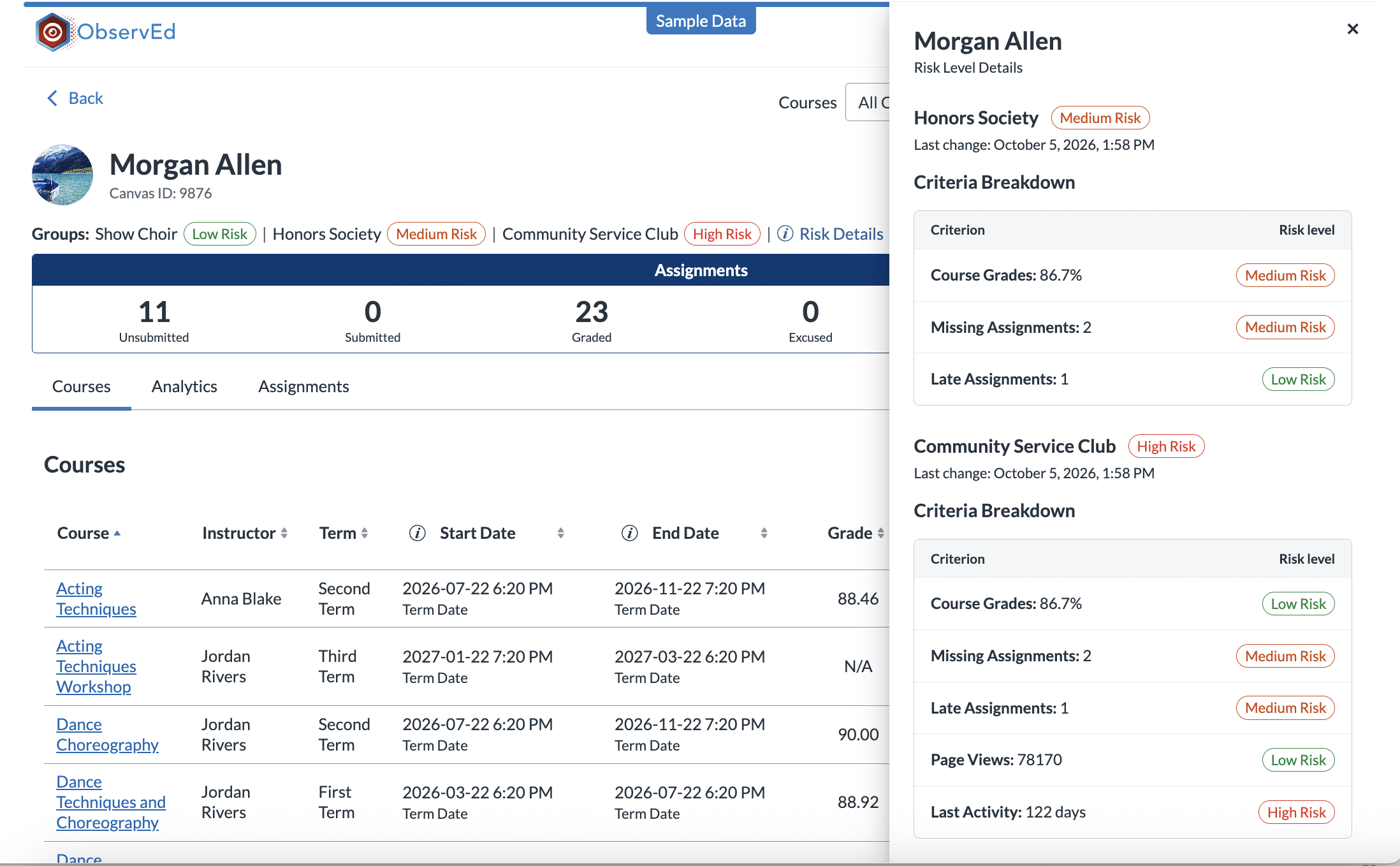
A student with several missing assignments likely needs attention. So might someone whose grades have dropped or hasn’t accessed a course recently. But what constitutes an academic risk can vary depending on the student population or program.
ObservEd’s configurable risk assessment feature allows you to establish institution and group-specific criteria using indicators such as:
Based on those criteria, ObservEd will assign students a high, medium, or low risk level overall and for each group they are a part of. Support staff can filter students by risk level and see which factors contributed to the assessment.
Institutions, whether K-12 or higher education, can tailor different risk configurations for different student groups. For example, an honors program might flag a student as high risk if a course grade falls below 80%, while an athletics program might use a threshold of 70%.
This flexibility allows support teams to evaluate academic performance according to the requirements of their programs rather than relying on a single institution-wide definition of risk.
ObservEd gives authorized staff a real-time view of grades, missing and late assignments, upcoming due dates, and course activity for the students they’re assigned to monitor, across their Canvas courses.
Recent updates include streamlined navigation, more filtering options, enhanced reporting, and improvements to group and term management. These changes make it easier to focus on specific students, review academic information, and manage the groups they’re responsible for monitoring.
ObservEd also limits access to assigned students, without requiring risky Canvas administrator permissions or enrollment in a student’s courses.
When staff identify a potential concern, ObservEd provides tools for tracking it and communicating with students. Authorized users can send messages directly to a student’s Canvas Inbox from within ObservEd. They can also place observer flags to mark concerns or situations that warrant follow-up.
Separate grade flags are triggered automatically when a student’s grades meet thresholds established by the institution.
The configurable risk assessment feature expands on those existing tools by considering multiple academic and activity indicators, with criteria tailored to different student groups.
Together, these capabilities help staff review academic progress, recognize potential concerns, and make informed decisions about when to reach out.
Watch our on-demand webinar, See, Support, Succeed: Monitoring Student Progress in Canvas with ObservEd, for a demonstration of ObservEd’s student monitoring tools and recent updates.
You can also learn more about ObservEd or request a personalized demo.
For more Canvas resources and product updates, follow Cidi Labs on LinkedIn, subscribe to the Cidi Labs Digest, or explore our upcoming and on-demand webinars.

Description