Welcome to the second edition of our new series: Design Forward, which focuses on giving Canvas course creators easy-to-implement design tips that can make a big impact for learners. With the research from our Design Matters series as the foundation, Design Forward aims to propel course design progress through inspiring ideas, community contributions, and clever, powerful tools from Cidi Labs.
The series also includes a Design Forward Challenge (with a chance to win a Cidi Labs stuffy, see below) and a companion webinar that brings these tips to life.
We’re jumping into the exciting world of Next-Level Canvas Navigation – essentially, how to support learner movement beyond the previous and next buttons.
“Good course design reduces the user’s cognitive load by streamlining navigation, organizing content intentionally, reducing the number of spaces a user must interact with to complete a lesson, and limiting the scope of navigation” (Johnson et al., 2023).
Research tells us that intuitive, consistent course navigation promotes learner self-efficacy right from the start, boosts student agency, helps sustain motivation, and supports concept retention, especially as content complexity increases.
So what are some specific, manageable navigational layers you can design into your Canvas course? Let’s explore some ideas:
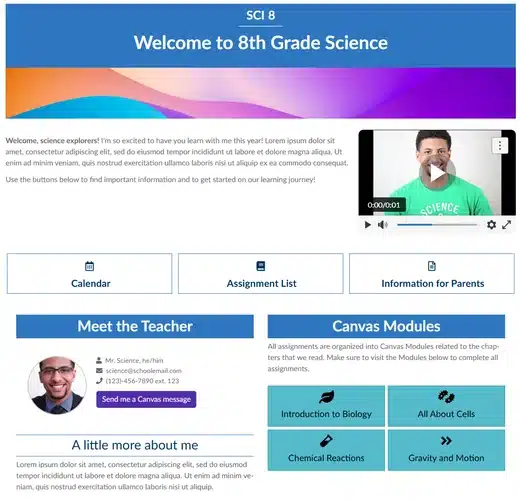
Creating and setting a Canvas course Home Page establishes a welcoming experience for learners, but it can also carry next-level navigational weight by making the course structure explicit and providing easy access to key resources. Consider applying one or more of the following design ideas to your course Home Page:

Navigation is not just about getting from one place to another. Great Canvas navigation design can also make the overall learning journey and its progression more apparent. Try adding one of the following designs to your course to support learners’ mental map and movement:


DesignPLUS makes it easy to build accessible card-based navigation in Canvas with no coding required! What’s more? With DesignPLUS, you can add a Progress Indicator to course content that automatically generates a module map and displays the learner’s location and item completion for the module!
Whether you’re hoping to support student agency or combat the issue where learners drop straight into an assignment from their dashboard To-Do list (completely skipping past key module content), supplementing module structure with non-linear navigation design can help. Consider using one or more of the following strategies to let learners easily reach relevant content in fewer clicks:
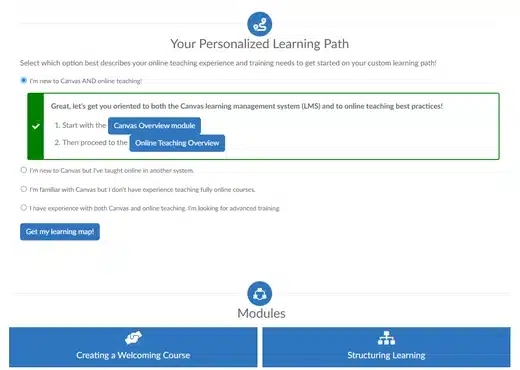

DesignPLUS Quick Checks can be used for interactive course routing via multiple-choice selection. Or, access dozens of prebuilt self-check content blocks–such as the Readiness Check–in the DesignPLUS Library, designed to let learner reflection lead the way.
This series is called Design Forward for a reason: these tips can be implemented quickly in the Canvas LMS without overhauling your entire course, helping you move your course design forward in a manageable yet impactful way.
⭐ The Challenge: implement one or more of the tips in your Canvas course and share out what you designed with the community. Submit a brief explanation and a screenshot or GIF to designforward@cidilabs.com.
By submitting, you’ll be entered to win a Cidi Labs stuffed labrador (get it, Cidi Labs?). We’ll share out submitted designs on social media and help expand the DesignPLUS Library with your amazing contributions!


Stacy Greathouse submitted an assignment chunked with Tabs and Cards to organize and streamline all the important case study information. She even created a custom Theme using DesignPLUS to ensure all chunked elements in the course receive the same colors and styling. Such a time-saver!
Want to see these tips come to life and dive deeper into the why and how with Canvas design experts? Register for our live Design Forward webinar, Next-Level Canvas Navigation, on November 19, 11am-12pm MT. The session will cover these tips and more, and feature live demonstrations for how you can implement the tips right inside Canvas.
We’ll be joined by special guest, Angie Redmon—a math professor and instructional trainer who uses her Angie Teaches Canvas YouTube channel to share practical, high impact course design strategies that instructors can put to use right away. Don’t miss this webinar to help you level up your Canvas course!
Citation:
Johnson, C. C., Walton, J. B., Strickler, L., & Elliott, J. B. (2023). Online Teaching in K-12 Education in the United States: A Systematic Review. Review of Educational Research, 93(3), 353-411.

Description