Welcome to the first edition of our new Digest series: Design Forward – a newsletter focused on giving Canvas course creators easy-to-implement design tips that can make a big impact for learners. With the research from our Design Matters series as the foundation, Design Forward aims to propel course design progress through inspiring ideas, community contributions, and clever, powerful tools from Cidi Labs.
The series also includes a Design Forward Challenge (with a chance to win a Cidi Labs stuffy, see below) and a companion webinar that brings these tips to life.
We’re kicking things off focused on Chunking Canvas Content – a topic central to quality course design.
“Chunking online instructional materials increases retained learning and consistently boosts information absorption at the item level.”
(Méndez-Carbajo & Wolla, 2019)
Simply put, chunking content means breaking it into meaningful, manageable segments to help learners better understand and retain the learning material. Research tells us that content chunking helps manage cognitive overload, supports mental model formation, reduces barriers for neurodiverse learners, and so much more.
Even this Digest is chunked into sections and subsections, with headings, color, and structure all working to help you read and organize the information.
So what are some specific, manageable ways you can employ a new content chunking strategy in your Canvas course? Let’s explore some ideas:
Step 1 is to organize your Canvas content into Modules (ex: by unit, by week, by topic). From there, consider applying one or more of the following design ideas to further chunk your modules:
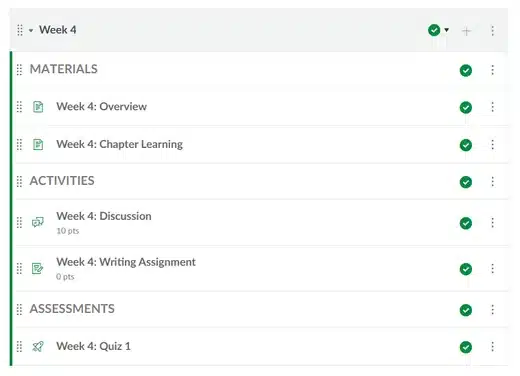

Let’s break up with giant walls of text by breaking up the text itself! For accessibility and usability, Canvas course creators should employ formatted Headings to chunk page-level content. But a little design goes a long way with these additional strategies:
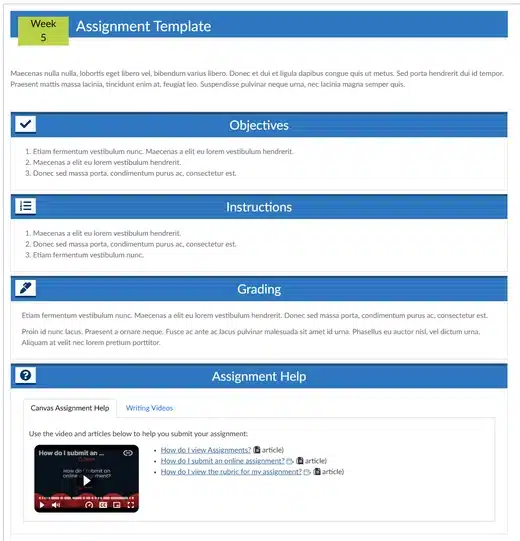

Especially with complex, dense, or long content, students may benefit from additional chunking at the subsection level. Here we can get quite creative where it counts, utilizing interactive and horizontally chunked designs to keep content manageable and communicate concept relationships, learning progression, and more! Think of an area in your course that could benefit from additional chunking, and try out one of these tips:

This Digest series is called Design Forward for a reason: these tips can be implemented quickly in Canvas without overhauling your entire course, helping you move your course design forward in a manageable yet impactful way.
⭐ The Challenge: implement one or more of the tips in your Canvas course before the next Digest lands in your inbox and share out what you designed with the community. Submit a brief explanation and a screenshot or GIF to designforward@cidilabs.com.
By submitting, you’ll be entered to win a Cidi Labs stuffed labrador (get it, Cidi Labs?). We’ll share out submitted designs on social media and help expand the DesignPLUS Library with your amazing contributions!
Want to see these tips come to life and dive deeper into the why and how with Canvas design experts? Register for our live Design Forward webinar, Chunking Canvas Content, on October 28, 10-11am MT. The session will cover these tips and more, and feature live demonstrations for how you can implement the tips right inside Canvas.
We’ll be joined by special guest, Lauren Janoska—the EdTech Empress, a Canvas LMS expert, educational technology consultant, and YouTube creator helping educators make the most of educational technology. Don’t miss this series kickoff!
Citation:
Méndez-Carbajo, D., & Wolla, S. A. (2019). Segmenting Educational Content: Long-Form vs. Short-Form Online Learning Modules. American Journal of Distance Education, 33(2), 108–119. https://doi.org/10.1080/08923647.2019.1583514

Description