Accessibility Matters Digest

A monthly newsletter bringing together research and action for accessible online course design.

Watch the recording of Accessibility Matters Live! Finding Your 'Why' to Motivate Action

the tip of an iceberg and the portion below the surface visible

How can learning about accessibility impact course design?

Welcome to the fifth edition of Accessibility Matters Digest, where we discuss the benefits of designing accessible courses, acknowledge the complexities in that process, and highlight the research and tools that can support delivering accessible courses in Canvas. This month, we’re exploring how understanding the purpose of accessible course design guidelines can prompt action toward creating more accessible courses.

“Faculty tend to have limited knowledge of laws, institutional services, and effective instructional practices for disabled students … However, research also shows that more exposure and awareness of training can improve faculty’s confidence and willingness to create inclusive learning spaces” (Lomellini et. al, 2025).

When it comes to designing accessible courses, often educators and designers are aware of the tip of the iceberg: course accessibility reports highlighting dozens of issues! You may have heard about various guidelines or seen accessibility checklists, but knowing what each standard means or why it matters might not feel straightforward. Plus, when the skills required to design accessible courses or resolve accessibility issues aren’t always part of traditional training in teaching or course design, many course creators are left unsure about where to start or how to fix the accessibility problems that surface.

There’s good news: research shows that course accessibility training can have a real impact (Lomellini et. al, 2025)! Diving under the surface and uncovering the “why” behind accessibility standards can help make the work of designing more inclusive courses less about compliance and more about creating effective learning opportunities for every student.

Let’s explore some research-backed tips to highlight the purpose of accessible design practices and support actionable accessibility progress, plus the tools that make it much easier in Canvas:

Understanding how inaccessible content can affect learning:

  • Connect to outcomes: Research suggests that approaching accessible design choices from a student outcomes perspective can motivate reluctant instructors to adopt accessible design practices (Lomellini et. al, 2025).
  • Increase empathy: If you’re creating accessibility training, consider leveraging some immersive experiences for your audience such as pulling a set of links out of context to communicate the need for descriptive link text or playing a lecture video without audio to illuminate the importance of captioned media. Experiential accessibility learning has been shown to increase motivation for designing accessible content (El-Glaly et al., 2020; Kletenik & Adler, 2022; Putnam et al., 2015).
  • Prioritize partnership: Accessibility training can run the risk of othering those with disabilities (Bennett & Rosner, 2019; Horton, 2021) when the reality is that accessible design is simply good design for all learners. To combat this effect, elevate the voices of those with disabilities in strategic planning and training and work with diverse groups when designing and evaluating courses to increase accessibility through authentic, collaborative understanding.
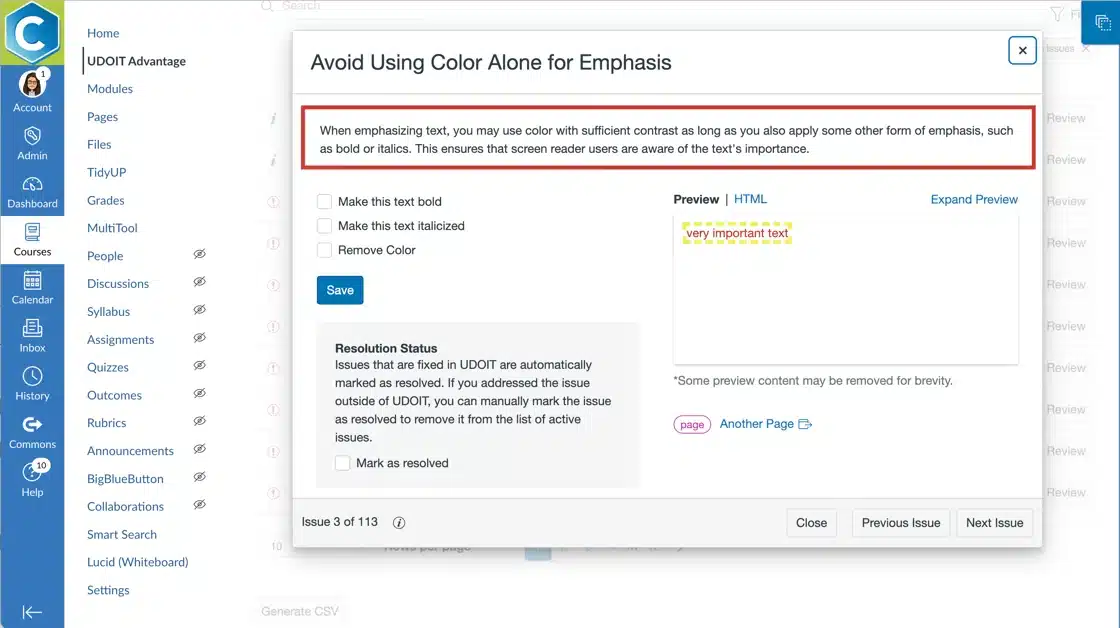
UDOIT showing issue with explanation, guidance, and the features to apply a fix
UDOIT Advantage provides explanations, actionable guidance, and repurposable tips for accessible course design for users while they remediate their courses.

Turning understanding into action:

Motivated to take action with an increased understanding of the ‘why’ behind accessibility guidelines, designers and educators may still feel overwhelmed by the remediation and accessible design process. Here, working in manageable bursts can really help! Tackling all instances of missing or insufficient alternative text across a course allows the course creator to get into a remediation rhythm, or checking accessibility for all content in an upcoming module defines a manageable goal to motivate action.
UDOIT Accessibility Scorecard high impact category expanding to reveal issue groups
UDOIT Advantage’s interactive scorecard home screen helps you easily identify accessibility issues to focus on. Plus, UDOIT conveniently groups issues so educators can put their accessibility knowledge to work in a manageable, efficient manner inside UDOIT—without having to edit each individual page in the course!

Continuous Improvement

Don’t get stuck in a repetitive remediation cycle! Increasing accessibility awareness and designing accessible courses proactively rather than remediating retroactively has been shown to be more efficient and provides a more effective learning experience for all students (deMaine, 2014; Guilbaud et. al, 2021; Kontio, 2025). A great way to kickstart that effort? Design and distribute accessible templates to scale accessible content creation across your institution.

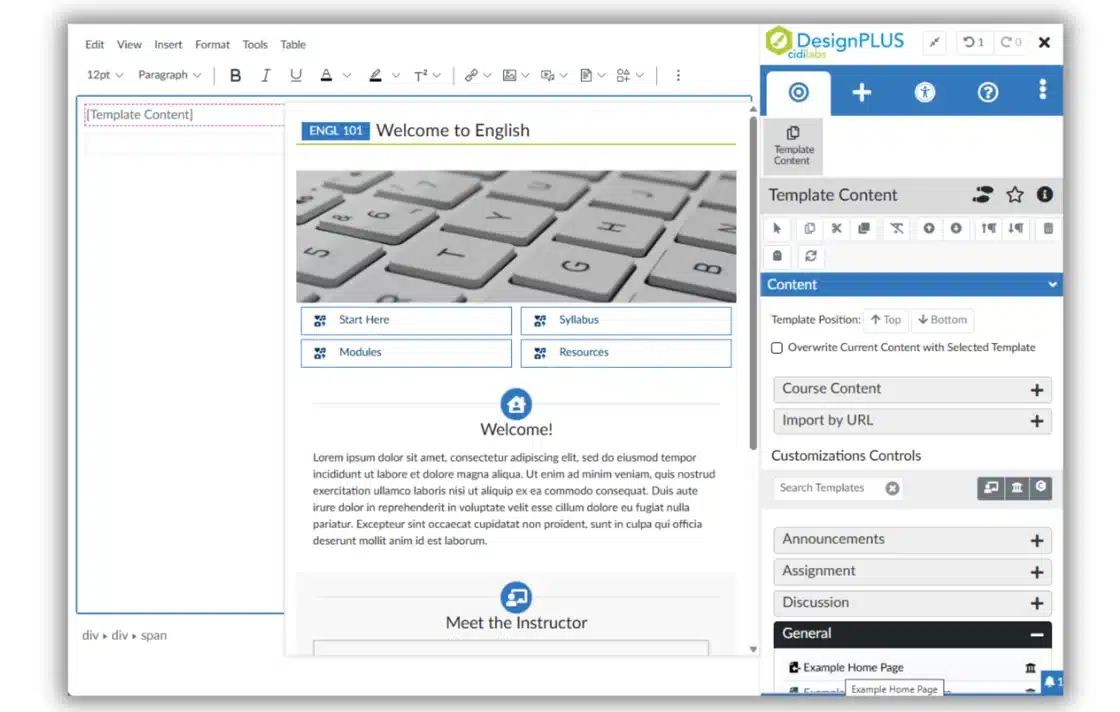
Direct template access from the Canvas editor using the DesignPLUS Sidebar
With DesignPLUS, it’s quick and easy to design accessible Canvas content and whole course templates–no coding required. Plus, instructors and designers have efficient access to whole item Templates and Content Blocks right inside the Canvas editor to help scale proactive, accessible course design.

We’ll bring these tips to life and do a deeper dive into the research on September 25th at 12pm MT in our upcoming Accessibility Matters Live webinar: Finding Your ‘Why’ to Motivate Action. Register now!

“Thank you for making accessibility easier to access and grasp with UDOIT. Without Cidi Labs and UDOIT, our faculty would struggle.”
– Megan Reinle, Instructional Design Consultant, Northeastern University

Bite-Sized Solutions

To keep the digest, well, digestible, each month we’ll deliver a bite-sized solution for a common accessibility challenge. We hope these small but mighty tips will empower you and provide momentum on your journey of developing and delivering accessible Canvas courses!

Challenge:
Got file frustrations? Making course documents accessible requires a specialized skill set for each file type–not to mention significant time.

Solution:
Convert inaccessible files to a Canvas page at the touch of a button with UDOIT Advantage. Then you can use the familiar Canvas editor (and UDOIT!) to make the new html-based content accessible! Bonus: You can even use DesignPLUS to format the page, fix accessibility issues, and add learner interactivity to the content!

Check out the 4-minute segment (41:11-45:16) of our recent webinar that showcases this solution!

Citations:

Bennett, C. L., & Rosner, D. K. (2019, May). The promise of empathy: Design, disability, and knowing the” other”. In Proceedings of the 2019 CHI conference on human factors in computing systems (pp. 1-13).

El-Glaly, Y., Shi, W., Malachowsky, S., Yu, Q., & Krutz, D. E. (2020, June). Presenting and evaluating the impact of experiential learning in computing accessibility education. In Proceedings of the ACM/IEEE 42nd International Conference on Software Engineering: Software Engineering Education and Training (pp. 49-60).

Horton, S. (2021). Empathy cannot sustain action in technology accessibility. Frontiers in Computer Science, 3, 617044.

Kletenik, D., & Adler, R. F. (2022, February). Let’s play: Increasing accessibility awareness and empathy through games. In Proceedings of the 53rd ACM Technical Symposium on Computer Science Education-Volume 1 (pp. 182-188).

Lomellini, A., Lowenthal, P.R., Snelson, C. et al. Accessible and inclusive online learning in higher education: a review of the literature. J Comput High Educ 37, 1306–1329 (2025). https://doi.org/10.1007/s12528-024-09424-2

Putnam, C., Dahman, M., Rose, E., Cheng, J., & Bradford, G. (2015, October). Teaching accessibility, learning empathy. In Proceedings of the 17th International ACM SIGACCESS Conference on Computers & Accessibility (pp. 333-334).
Name

Position

Description