Accessibility Matters Digest

A monthly newsletter bringing together research and action for accessible online course design.

Watch the recording of Accessibility Matters Live! Managing Accessibility Initiatives and Continuous Improvement

Team putting large puzzle pieces together

How can my institution manage an accessibility initiative?

Welcome to the fourth edition of Accessibility Matters Digest, where we discuss the benefits of designing accessible courses, acknowledge the complexities in that process, and highlight the research and tools that can support delivering accessible courses in Canvas. This month, we’re exploring how institutions can manage and support large-scale accessibility initiatives.

“Shifting the campus culture toward accessibility and inclusion is an on-going process. As such, to reach this goal campuses need to commit time and tangible resources to increasing knowledge and implementation of accessibility principles”
(Thornton et. al, 2023).

Between a desire to deliver effective learning experiences and various mandates to ensure course content is accessible for all learners, institutions are looking for strategies, tools, and resources to help make real progress on their journey toward more accessible courses. But managing a large accessibility initiative and coordinating the many parts and players from end to end is no small feat. If leading an accessibility initiative feels overwhelming, know this: you’re not alone! Many institutions are with you on the path, ready to share strategies and resources—and so is Cidi Labs.

Let’s explore a “three C” strategy–Commitment, Coordination, and Continuous Improvement—packed with research-backed tips for managing an accessibility initiative, some examples from various institutions, and the tools that streamline and support the important work:

Commitment:

Genuine commitment is the foundation of a successful initiative. In fact, Dr. Jeffrey Kontio’s research found that when accessibility practices were required or strongly recommended at an institution, implementation and effectiveness was deemed much more successful than when considered optional or aspirational (Learn more about Dr. Kontio’s research findings in our June Accessibility Matters Live webinar). Worried about pushback to a strong commitment? Ensure commitment isn’t simply talk with no action by:

  • Defining a tangible goal: In order to transform ideas into outcomes, institutions can convert the abstract concept of accessible course design to a concrete set of priorities and goals based on their institution’s needs. For example:
    The University of Minnesota has 7 Core Accessibility Skills that allow them to evaluate their current status, support strategic improvement, and measure success.
    The University of Illinois-Springfield focused concerted efforts toward remediating their most common error: 19,000 instances of color alone used for emphasis!
  • Dedicating resources and time: Dr. Kontio has developed a working framework called the Institution Commitment Threshold. He shared with us that, “Leaders must do more than endorse accessibility in principle; they must resource it in practice” because “the threshold will not be crossed passively; it requires leadership that acts with purpose and urgency.”
  • Leveraging some levity: Many institutions have used friendly competition, personal challenges, and other memorable initiative branding to boost buy-in and build awareness of their initiatives. Here are a few examples:
    • Northwestern University has dubbed a segment of their accessibility initiative “Mission: Accessible” and maintains a public Hall of Fame page for educators who complete the challenge.
    • Foothill College developed a 10-Day Accessibility Challenge video series, kickstarting their institution’s accessibility work with fun framing and a manageable process.
    • Duke University’s UDOIT Superstar Badge recognizes educators’ efforts in improving accessibility using UDOIT by awarding a high-quality, verifiable digital badge.

We’ll highlight even more research-backed strategies and real-life success stories on August 26th at 12pm MT in our upcoming Accessibility Matters Live webinar: Managing Accessibility Initiatives and Continuous Improvement. Register now!

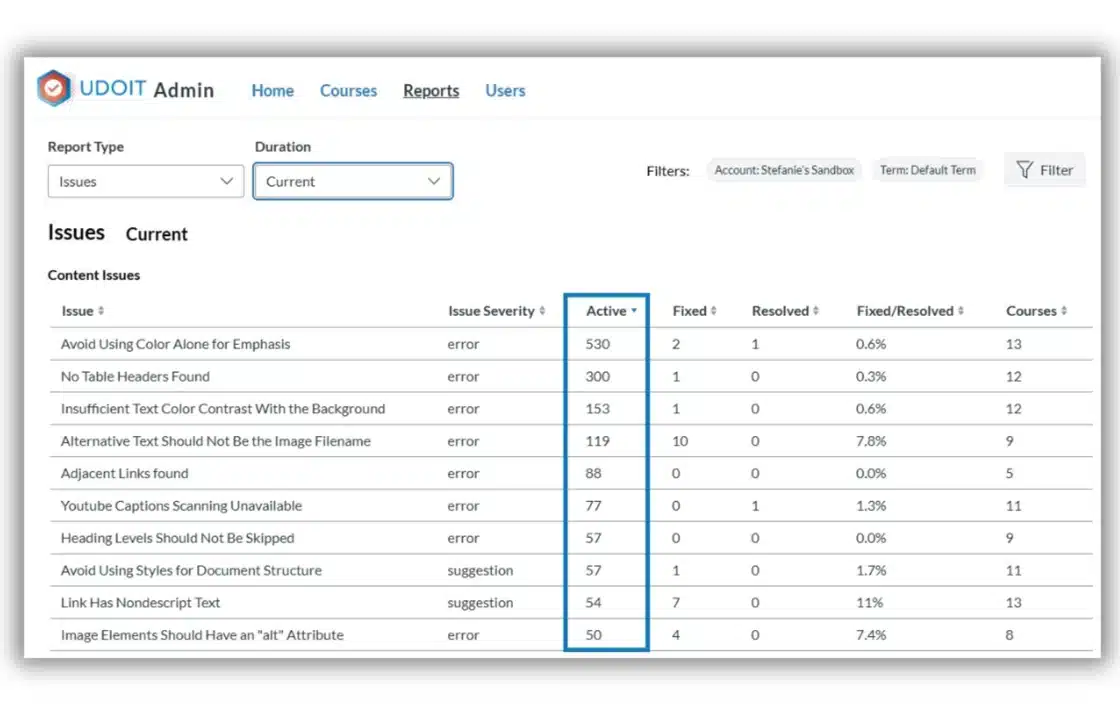
UDOIT Admin Report sorted for issue with highest number of active instances
UDOIT Advantage Admin Reports allow institutions to easily identify the scope of the work ahead and even drill down into accessibility issues requiring significant attention. Plus, UDOIT’s helpful issue grouping allows educators to efficiently remediate accessibility issues in line with the institution’s goals.

Coordination

Once commitment is established, institutions must organize, streamline, and support the many hands participating in the accessibility work since “…it is not possible to achieve fully accessible learning experiences without the ‘concerted effort of all stakeholders…working together’” (Fisseler & Schaten, 2010, as cited in Seal et al., 2020). But how? Instructional design teams or other accessibility champions can develop training and resources aligned with the institution’s tangible accessibility goals to increase knowledge and promote action. For educators tasked with remediating their course content, provide a checklist aligned to the goals and those support resources embedded with each actionable task.

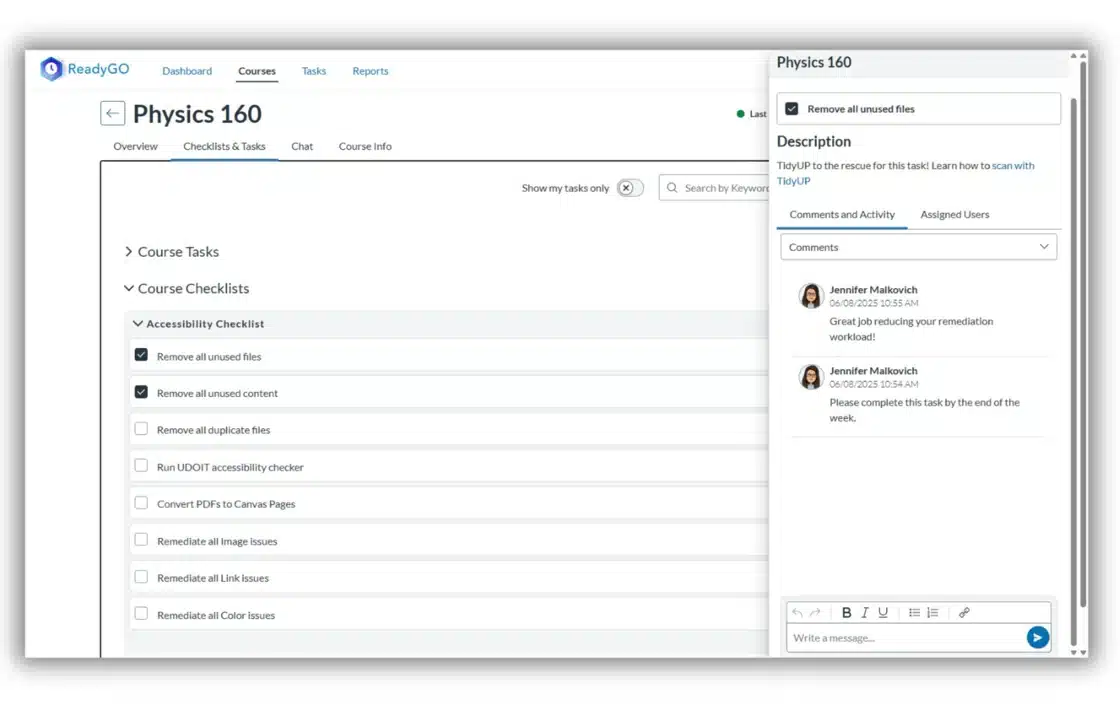
ReadyGO Accessibility Checklist item with linked resources and comment history
ReadyGO streamlines all of the coordination work right inside Canvas. For any custom Batch of courses, you can see key course data (such as error count in UDOIT), apply a custom checklist, assign checklist tasks to the right users, link training resources with each task, communicate right inside the tool, and easily monitor progress.

Continuous Improvement

Don’t get stuck in a repetitive remediation cycle! Increasing accessibility awareness and designing accessible courses proactively rather than remediating retroactively has been shown to be more efficient and provides a more effective learning experience for all students (deMaine, 2014; Guilbaud et. al, 2021; Kontio, 2025). A great way to kickstart that effort? Design and distribute accessible templates to scale accessible content creation across your institution.

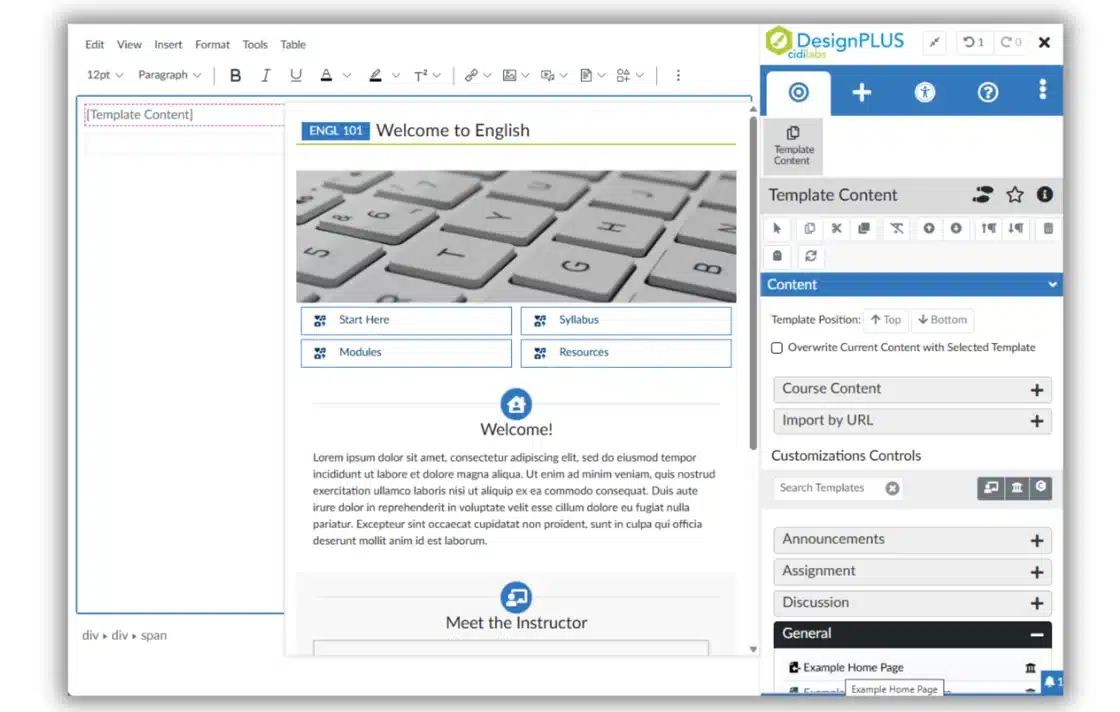
Direct template access from the Canvas editor using the DesignPLUS Sidebar
With DesignPLUS, it’s quick and easy to design accessible Canvas content and whole course templates–no coding required. Plus, instructors and designers have efficient access to whole item Templates and Content Blocks right inside the Canvas editor to help scale proactive, accessible course design.

“UDOIT provides an easy interface for ensuring that a course is accessible to all users. I love telling faculty how easy it is to use and seeing the looks of relief on their faces.”
– Lori Austill, Instructional Technology Consultant, Idaho State University

Bite-Sized Solutions

To keep the digest, well, digestible, each month we’ll deliver a bite-sized solution for a common accessibility challenge. We hope these small but mighty tips will empower you and provide momentum on your journey of developing and delivering accessible Canvas courses!

Challenge:
Templates seem like a great vehicle for scaling your accessibility efforts–if only your users would remember to remove the support information and guidance before publishing the content!

Solution:
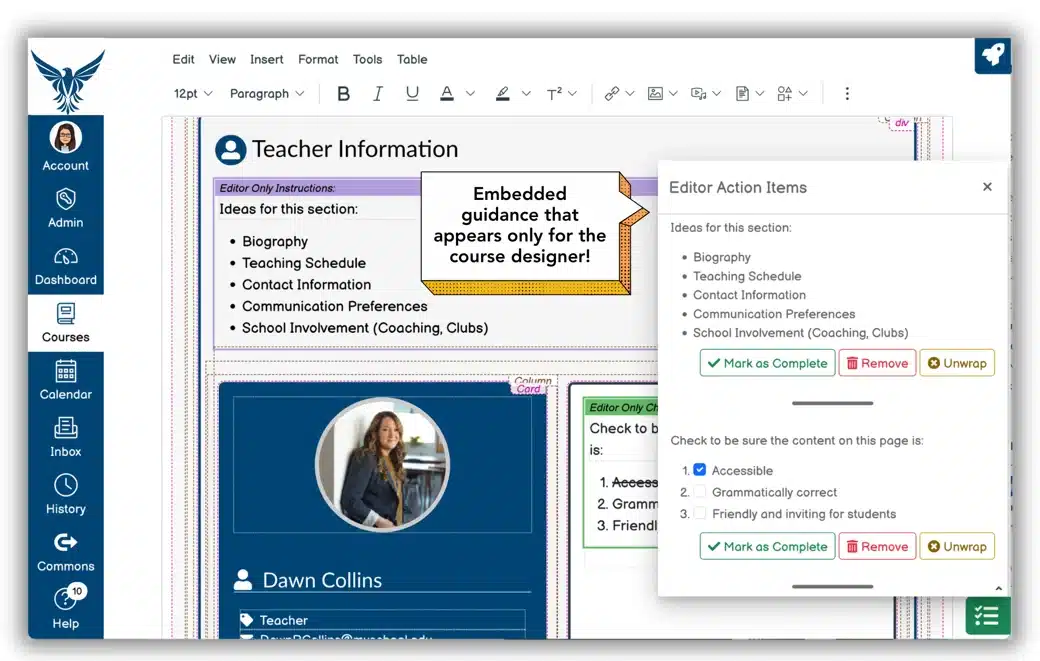
DesignPLUS Action Items allow you to add hidden, editor-only information in your Canvas templates. Drop checklists (with a reminder to scan for accessibility issues before saving!), notes, text suggestions, input lines and more right into the Canvas editor. Link key resources and provide guidance without worry learners will see it. Phew!

alt="Editor Action Items popup next to Canvas home page"

Citations:

deMaine, S. D. (2014). From disability to usability in online instruction. Law Libr. J., 106, 531.

Guilbaud, T. C., Martin, F., & Newton, X. (2021). Faculty perceptions on accessibility in online learning: Knowledge, practice and professional development. Online Learning, 25(2), 6-35.

Kontio Jr, J. P. (2025, April). From reactive to proactive: Leveraging Learning Management Systems for a more accessible learning experience. In Proceedings of the 2025 ACM SIGUCCS Annual Conference (pp. 1-4).

Seale, J., King, L., Jorgensen, M., Havel, A., Asuncion, J., & Fichten, C. (2020). Engaging ignored stakeholders of higher education accessibility practice: analysing the experiences of an international network of practitioners and researchers. Journal of Enabling Technologies, 14(1), 15-29.

Thornton, M. L., Mushtare, R. W., Harris, L. J., & DeForest, K. M. (2023). 10-Day Campus Accessibility Challenge. Journal of Postsecondary Education and Disability, 36(1), 23-39.
Name

Position

Description